• Skip to primary navigation
  • Skip to main content
  • Skip to primary sidebar
  • Skip to footer
  • Business Report
    • 20 Top Research Organisations
    • Tobacco Laws
  • Takeovers & Mergers
  • Doing Business
    • Start-up
    • Tax Review
  • Video
  • Biz Directory
    • Free Directory Listing
    • Links
  • Guest Post
  • Contact
    • About

Australian Business News and Times

Business News ,Reports and Times of Australia

  • 2011
    • 2010
  • Business
    • Small Business
  • Mining
  • Real Estate
  • Australia
    • Australian
    • ASX
  • Finance
    • Report
  • Offers
  • Times

Reporter

How Does Reverse Cycle Air Conditioning Works?

June 15, 2017 by Reporter Leave a Comment

clip_image002

https://pixabay.com/en/ice-cream-cone-melting-hot-1274894/ – Toshiba Carrier Air

A reverse cycle air conditioner is a great system as it both warms and cools your home. This means that not only will you be able to keep yourself cool during those hot Aussie summers, but you’ll also be able to keep yourself warm when winter rolls around.

Having a system that offers both options means only needing to invest in the one product. Whilst it can be a large investment at first, it will save you money down the line, and means you get to avoid purchasing bulky electric heaters or fans.

So how exactly does a reverse cycle air conditioner work? Read on as we break it down, so you can get a better understanding of how it both heats and cools your home.

How it heats your home

The system works by extracting the cool air from outside and bringing it inside. Once is has been brought in, the refrigerant (a cold liquid) is passed through an external coil, where it then absorbs the heat from the air.

The refrigerant, once it has absorbed the heat, is pumped by a compressor, down into a condenser. The process of compressing the refrigerant helps to warm it up to the desired temperature. By use of a fan, the air is pushed into the room, which heats the room up.

Once the process is completed, and the hot air is being pumped into the room, the refrigerant is taken back down through an evaporator where it is cooled back down, before it is pumped back to the condenser to repeat the process.

How it cools your home

The process is completely identical when it comes to cooling your home. The only difference is that cold air is blown into your home, which means the process is simply reversed. So rather than the refrigerant warming up the air, instead it cools it down.

This is great because you don’t need to buy two systems to do both processes for you. The one reverse cycle air conditioner will do both, with no extra hassle to you.

Inverter technology

It is becoming increasingly popular to see inverter technology within reverse system air conditioners. Inverter technology allows the air conditioners to adjust the power to reach the desired room temperature and maintain it. This is in contrast to traditional models that just have an on/off button, and this therefore makes the system far more efficient.

This also helps the air conditioner to be more economical, as it reaches the desired temperature far quicker than conventional methods, and reduces the need to keep turning the air conditioner on and off.


Filed Under: Australia, Australian Tagged With: Business, Electronics, Retail Online, Retailers

Top 10 SEO Tips For Your Business in 2017

May 16, 2017 by Reporter Leave a Comment

seo quick tips for business

Every single business, large and small, is now aware of the need to have a well-maintained and efficient website. The best websites drive traffic towards your business, which means they need to be easy to find, as well as persuasive and informative for your customers. One of the best ways to achieve all of these goals and be confident that your website is performing at maximum capacity for your business is by following these 10 SEO tips from industry experts.

1. Focus On Popular Keywords

This means researching the terms that are actually being searched for, not just deciding which words suit your site and focusing on them.

2. Use Keywords Effectively

A few years ago, stuffing content full of keywords was enough to fuel SEO. However, this is no longer the case, and it’s now prudent to monitor how much of your content is made up of keywords, as 1-3% is currently seen as the perfect balance. It’s easy to make sure you’re meeting this criteria with Keyword Density Checker.

3. Gain Legitimate Backlinks

Backlinks from spammy websites are a big no-no for SEO, however carefully cultivated backlinks from legitimate websites can be a huge boost for your rankings.

4. Keep an Eye on Your Competitor

In today’s market, your competitors are multiple and international – keep an eye on what works well for them, and also learn from their mistakes. Ah Refs is a great tool to keep on top of this kind of data.

5. Work On Becoming Authoritative

If you want to stand out, you need to show you are an expert in your field. This means focusing on quality content, that’s original and really offers something to your customers. Guest blogging is a great way to show you’re respected in your field. If you’re not sure how to present yourself this way, there’s plenty of advice from professionals in the forums at Paper Fellows.

6. Learn About SEO

Many businesses want to fuel SEO without really understanding how it works, which is essential if you want to stay ahead of your competitors. Spend some time on Yoast to really get a good idea of the subject.

7. Use Online Editing Resources

Successful entrepreneurs have an amazing set of skills, however creative writing isn’t necessarily one of them. For this reason, many businesses are opting to make the most of online editing tools to improve SEO such as Essay Roo or Australian Help. These sites, as well as Big Assignments are a great platform to find a qualified editor or SEO expert who can optimize your content for the web.

8. Size Matters

Search Engines have acknowledged that the length of the content plays a part in SEO. Over 1000 words is better for SEO, while social media studies show that 1500 words is ideal for audience engagement. It’s easy to monitor this with Easy Word Count tool.

9. Focus On Your Title and Meta Descriptions

When your page appears in the search results, you need to make sure it stands out from the rest and is most appealing to your readers. The more people click on your page, the more traffic and conversion leads you get, and the more your rankings improve.

10. Be Mobile Friendly

As millions of people access the internet over mobile devices every day, you lose a lot of business if your site isn’t mobile friendly. First, the bounce back rate from your site increases, which is bad for SEO, and crawlers assess this feature anyway, which is also bad for SEO. It’s extremely important to make sure your site is mobile friendly.

Overall, SEO is becoming a lot easier to integrate with a high quality website, and following these tips can help you really make the most of your website.

Filed Under: Technology, Website, Website Builder Tagged With: 2017, Seo Tips

Smart Tips to Foster a Promising Relationship with Your Channel Partners

May 16, 2017 by Reporter Leave a Comment

customer service 2017

Your channel partners play a key role in how your products perform in the retail markets. Since most channel partners sell multiple products including your competitors’, in the general consumer markets, you cannot take them for granted at all. Channel partners can literally make or break your sales.

If you want to meet your sales goals and increase profits, you need to have a sound relationship with your channel partners. Here are some essential tips to improve channel partner relationship and uplift your profits and sales.

  • Let Them Decide on the Margins

Business relationships with your channel partners are all about preserving your business interests and profit goals. Establishing a strategic relationship with your channel partners requires extensive working to settle on agreed terms that reap mutually beneficial benefits.

Channel partners seek to establish partnerships with businesses that offer flexibility, convenience as well as optimal profitability. Businesses on the other hand demand smooth and efficient distribution of their products and the accomplishment of targeted sales objectives. A better idea is to let the channel partners decide on the profit margins and discount strategies that also complement your business objectives.

  • Get Them On Board in Campaigns

solutions for your company  channels

Involving your channel partners in designing sales-oriented promotional campaigns is a good strategy to boost your sales. Channel partners being the intermediaries between the business and retail markets have a better understanding of consumer’s preferences and the factors that influence their purchase decisions.

Getting them on board to devise short-term strategies to increase sales is a good approach to create on-point promotion campaigns that hit just the right notes and accomplish the goals. This will also instil confidence and trust between you and your channel partners.

  • Ensure Instant Resolution of Errors and Conflicts

Errors, setbacks, and conflicts are the common occupational hazards that come along with the advantages of a business partnership. Make it a point to keep a regular check on the scheme of things and regular operations. This will help you identify any issue or conflict related to price or distribution mechanism and makes it convenient for you to troubleshoot in a timely manner.

  • Conduct Periodic Consultation

In order to foster a profitable and lasting relationship with your channel partners, you need to have an insight into your channel partner’s opinions, concerns, and perception about your business. Conduct regular meetings, and ask them for their opinion on how they think the relationship can be improved.

Devise a comprehensive channel partner program and offer incentives, recognition, and rewards. Certain automated, cloud-based programs such as Power2Motivate make it convenient for you to establish a platform to improve your relationship with channel partners and seek an accelerated business sales.

  • Seek Lasting Relationships

Switching between the various vendors, distributors and channel partners will only bring you a bad repute in the market. It will negatively affect your credibility and revoke the top vendors and distributors from establishing a partnership with your business.

Do a thorough research and analyse your option before establishing a sales partnership. Once you have made the deal, you must focus on how you can sustain it for long term prospects.

Filed Under: Small Business Tagged With: Sales, Solutions

Small Business

April 20, 2017 by Reporter Leave a Comment

You can choose to set up a customised bookkeeping system manually using accounting books cds , electronically via spreadsheets and cloud  or use simple  accounting software

Here is a list of Accounting software for Small businesses  to be compliant with ATO accounting methods according to ato website.

accounting software reviews australia

There are many software packages on the market that allow small business  to successfully control accounts and records without an accounting qualification.

Below accounting software is intended to be developed , keeping in mind the ato accounting guidelines.

accounting software australia calculator

Building and construction industry

As part of the 2011-12 Federal Budget, the government announced the introduction of taxable payments reporting for businesses in the building and construction industry.

The Taxable payments annual report will be required to be submitted by those businesses in the building and construction industry that have paid contractors for building and construction services

From 1 July 2012, businesses in the building and construction industry need to report the total payments they make to each contractor for building and construction services each year. You need to report these payments to us on the Taxable payments annual report.

A list of those developers who have registered their intent supporting the new Taxable payments annual report in their products for the 2012-13 financial year below

Small business accounting software

Accentis Enterprise

Web Address
http://www.accentis.com.au

Description

Accentis Enterprise is a fully-integrated accounting, business management and manufacturing system (ERP/MRP) suitable for businesses having between 2 and 100+ users. Designed for small to medium-sized businesses who have outgrown their off-the-shelf system, Accentis Enterprise is fully designed, manufactured and supported in Australia and has been tailored to suit Australian business who need an affordable, feature-rich and flexible business management solution.

All modules are designed as part of Accentis Enterprise, not third-party add-ons, and include:

– General ledger & financials
– Customers, receivables and Customer Relationship management (CRM)
– Suppliers, payables and Supply Chain Management (SCM)
– Inventory management & warehousing
– Job costing
– Manufacturing (kitting, BOMs, MRP)
– Payroll & Human Resources
– Fixed Assets
– Reporting (over 500 standard reports, all customisable)

MYOB AccountRight Enterprise

Description

Business intelligence and accounting software.
Like AccountRight Premier only more advanced. Use MYOB AccountRight Enterprise (formerly MYOB Premier Enterprise) to drill down to your accounts, payroll and warehouses from wherever you are using Terminal Services. It really does take your numbers to the big stage. It also comes with a 12 month membership to MYOB Cover.

 Xero.com

join for free trail 1

If you want  you can also Try the Demo Company (AU)  and have a play, try out new features and get familiar with Xero, before actually buying – but i would suggest just  getting the free trial first is better which can be done in a few steps (takes 5 minutes) as shown above and giving it a go.


Accrivia

Web Address
http://www.accrivia.com.au

Description

The Accrivia software package offers a range of accounting and operational modules software  (including General Ledger, Cashbook, Payroll, Debtors, Creditors, Jobs / Projects, Inventory and Web Interfacing) and caters for small and medium businesses that require more than an ‘off the shelf’ accounting package.

QuickBooks 2012-13

Web Address
http://www.reckon.com.au

Description

QuickBooks 2012-13 allows access for up to 30 users simultaneously (depending on version used) and includes a comprehensive payroll module, industry specific editions, accounting reports and multi-user capability. QuickBooks 2012-13 also includes the ability to submit your BAS return via the Standard Business Reporting online system.

Classic Software

Web Address
http://classicinfo.com.au

Description

ERP Software for the Mining, Exploration and Oil & Gas Industries

ClearAccounts

Web Address
http://www.clearsoftware.com.au

Description

ClearAccounts is a complete windows based multi-user accounting system designed with flexibility for medium to large size companies, compliant with ATO regulations. The core modules include Debtors, Inventory, Creditors (Cashbook), and General Ledger and can include Purchase Orders, Sales Orders, Payroll, Job Costing, Bill of Materials (Kits), Fixed Assets, Sales Quotes, Foreign Shipping, Overseas Creditors, Colour Selections (Tiles), Point of Sale and Masterviews & Charts, fully integrated. ClearAccounts includes electronic creditors payments bank file creation, electronic filing of BAS, bulk emailing facilities and can have custom modifications to meet specific company requirements

Arrow Financials

Web Address
http://www.arrow.net.au

Description

Arrow Financials delivers to businesses timely and accurate information, smart drill downs menus, extensive audit trails, real time interactivity for immediate data update and response. Arrow Financials is modular in its design, which enables you to select the modules in a combination that best meets your individual business requirements. Available modules include Arrow Financials include: Cashbook, Debtors, Creditors, General Ledger, Job/Time Costing, Fixed Assets, Payroll, Purchase Orders, Sales Orders, Stock, Bill of Materials, Foreign Currency, Multi-Company, Security Matrix, Special Pricing Matrix, Front Counter, Serial Batch Tracking, Advanced Sales Analysis.

Tax Assistant

Web Address
http://www.softassist.com.au

Description

Preparation and electronic lodgement of all tax forms 2001 to 2013.
Tax Assistant integ

Attaché Accounts

Web Address
http://attachesoftware.com

Description

Attaché Accounts software is aimed at small to medium businesses that have outgrown off-the-shelf packages and require better network performance, customisation and control. Operational benefits include faster order processing, more flexible pricing, improved stock control and warehouse management, faster debtor payment and advanced reporting. In addition, Attaché Accounts provides specialist solutions such as CRM, Job Costing, Manufacturing and electronic document delivery. Attaché Accounts has no large upfront software payment, just a low monthly amount, and you can scale the software (up to 100 users) to match your growth

Interactive Accounts Manager [IAM]

Web Address
http://iam-online.com.au

Description

Web based online accounting software produces standard reports & SBR reports. The user can interact with their accounting professional well within the software.
This is an ideal software for ABN contractors, Sole traders and micro & small businesses.

E-record replacement

Software to replace E-record software  download is  over here

More information here http://www.ato.gov.au/businesses/paymentsreporting

Filed Under: 2013, Australia, Australian, Business, Business News, Finance, Small Business, Small Business Tagged With: Accounting software, Small business payroll

Free Budgeting software for home business and sole trader

April 16, 2017 by Reporter Leave a Comment

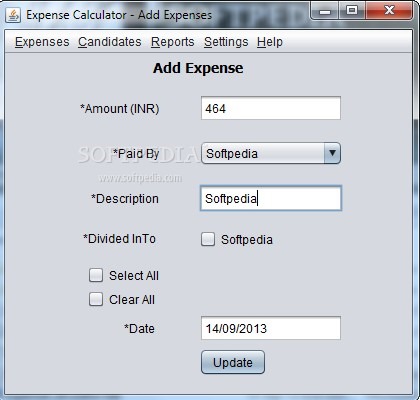
This free “Expense Calculator  software” is a practical and reliable Java based application that helps you to quickly add, analyze and manage various payments or expenses for you if your just running a home business or then even as a sole trader .

The tool is pretty basic and not an full accounting software package

free accounting software
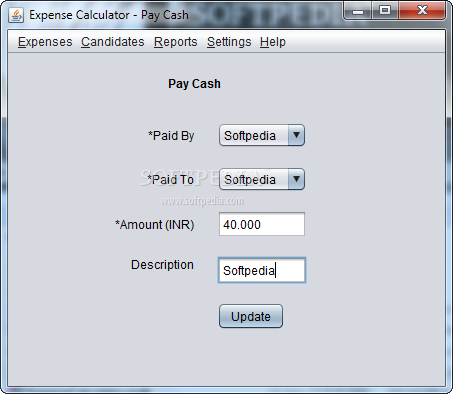
Expense Calculator features a very simple and  intuitive interface and the options are well-organized. With this Software , you have the possibility to quickly add as many candidates as you want so you can easily organize the payments.
Also, you are able to view all the transactions so you know if you will receive or transfer funds.

Expense Calculator screenshot 2 - The application enables you to quickly add new payments by selecting the candidates

Pics from softpedia

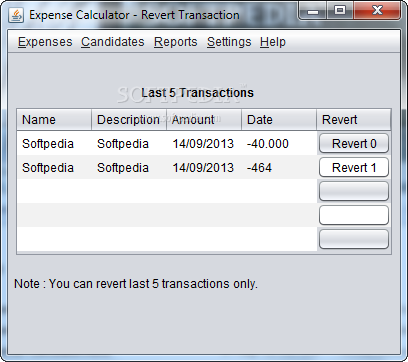
Expense Calculator screenshot 3 - You have the possibility to view and analyze the last five transactions within minutes

This tool has been released by an Indian software group called saksham group and  the software can be downloaded free here at SOFTPEDIA

Some more Accounting softwares list :

Some commonly used accounting systems used by small businesses are

  • MYOB.
  • QuickBooks.
  • Reckon One.
  • Sage.
  • Xero – online.
  • Cashflow Manager.
  • Nominal.
  • Saasu.

Filed Under: 2013, Australia, India Tagged With: Accounting software, Budgetting, Small Biz, Software

How To Make A Perfect Website And The Best Tools To Achieve It

April 6, 2017 by Reporter Leave a Comment

building something  online

So you want to build a website, but you have no idea how to get started. You’ve never done it before, and you have no idea how to code. Are you really capable of doing this? Of course you are. Here’s some tips on how to get the perfect website built, and some very useful tools to help you achieve your vision.

You don’t need to know how to code

Even a few years ago, you couldn’t have created a website without knowing at least some code. Now, though, there’s lots of software available online that will help you get your website together. It’s all online, so there’s no need to download anything. It’s easy to use, too. Most software just lets you drag and drop features, so everything is exactly where you want it. The best part is that it’s all simple to understand.

Use templates

If you’re a real newbie when it comes to putting a website together, you may not know where each element of the site should go. That’s why templates are a good idea for you. You can pick one, and then change the text and images to get it looking unique and designed with your purposes in mind.

Buy your own domain name

1 click install for webs and cpanel

Using online website builders is a good idea, but one drawback is that you won’t have your own domain name. That can be easily fixed, though. All you have to do is go and buy your domain. Think of something short and snappy, that will describe what your website does. Buy that domain, and then link it to your website. The directions will this differ depending on which software you’re using, but finding the instructions is easy. Once that’s done, if you type in your new website address, it’ll point to that website. Easy!

Integrating eCommerce

If you’re going to sell through your website, before you do anything you need to check if your software can handle it. Most website creators have some form of eCommerce tools available, but you want to ensure that it will be safe for people to buy from you. That’s why Secure Socket Layer (SSL) technology must be present, to avoid identity theft.

Have confidence in yourself

You may not have built a website before, but you’ve used plenty and you know what a good website looks like. You can create a website with just a few clicks, so it’s easier than ever to get started. You too can create something great online.

Tools to get you started

Ready to get making your website? Then here are some tools that you can put to good use:

– Avocode: This website gives you the easier way to code your own website. You can even invite in collaborators to give you a hand.

– Sketch: This graphic design tool is used by high ranking websites such as Buzzfeed, Paypal and Google. It makes the process of designing your site much simpler and easier to understand.

– Best Australian Writers: You’re going to need content, so why not get help? This site gives you access to all of the writers that you will ever need.

– UXPin: You’ll need to play around with different elements of your website design before you can implement them. This tool allows you to do this with ease.

– Marvel: This is the best tool to start creating prototypes of your website. Get a feel for how it looks before it goes live.

Now you have the tools to hand, go create that website. You too can create a website that visitors will love.

Filed Under: Business, Website Builder Tagged With: Website builder, Websites

Flicking the Switch – 5 Easy Office Additions to Simplify the Workplace Experience

March 29, 2017 by Reporter Leave a Comment

office work space

Think of all the time we spend in our working environments.

Most people in full-time employment spend 38-40 hours at work per week. If you were to add that up for every week of the year (and factor in 4 weeks of annual leave per year), you’d get 1,824 hours per year. That’s a lot of time to be spending in a complex, unhappy workplace.

If you’re looking to enrich, simplify and brighten your working days, look no further. Here are 5 ideas for easy additions to your office to help keep your daily grind more manageable.

Upgrading Your Technology

One of the most challenging and overly complex parts of many modern workplaces is the (often archaic) and convoluted technologies we have to work with. Forward-thinking workplaces are adopting smarter, easily integrated technologies, like VOIP ( try Commander Centre VoIP Phone Systems) which allows workers to communicate instantly with the use of voice, over a safe, stable internet connection.

This eliminates some of the haziness of email communication and the constant back-and-forth emailing can bring.

Bring The Outside In

This might sound counter intuitive, but bringing a little bit of the outside world into your workplace can create a mood of lightness, brightness and calm.

Q: How can a workplace bring in the outside world?

A: Plants. Indoor plants can add vibrancy and much needed fresh air to an otherwise dull and grey working environment. Plants remind of of our connection to the outside world, and they are great for creating transitions between employee work spaces (rather than bland partitions and doors).

The inclusion of plants in our workplaces is also thought to add to our productivity – welcome news for both employers and employees!

Breaking Out

A fun and varied workplace environment encourages colleagues to congregate and feel at ease in their surroundings, and it can also create a further sense of calm (see above).

Create spaces within spaces at your workplace; like an area for relaxing with a coffee, or for lunch-breaks. If you have the room and the resources, add an area with games (table tennis, table soccer, air hockey). Some other less-noisy (and costly) ideas include adding a craft area (with basic supplies like magazines, glue, scissors and paint for scrapbooking) and providing a coffee machine. A well caffeinated workplace is a well-working (and fast working) workplace! It’s a ‘daily grind’ you can really get behind.

Encouraging employees to use these little spaces also reduces the time spent outside of the working environment, which can add to overall business productivity. It also encourages creativity in the workplace, and provides an outlet for stress relief.

Keep A Central Portal

Another simple (often overlooked) factor in creating a simplified, happy workplace, is to have an easily available employee portal, like an ‘intranet’ site. These are one-stop-shops for employee information, contact numbers, and important HR/Payroll notices. Referring employees to a company intranet site for information and important information is much easier, and much more reliable than individually disseminating information.

Light & Easy

Another so-simple solution to workplace doldrums, is the introduction of ambient and bespoke lighting.

To achieve this, place lamps, lanterns, and other devices which distribute and diffuse light (in more pleasant ways than traditional fluorescent tube lights) across the workplace accordingly. An added benefit to doing this, is that it can modernise and redecorate a tired workplace. Win, win!

—

There are many cost effective and easy solutions to the myriad complexities of workplace life.

Armed with some of the fixes above, you will hopefully have a better understanding of how to introduce calm and simplicity into your working environment.

Filed Under: Australia, Business Tagged With: Technology companies, telecom department

The open-plan effect: how it affects your health & productivity

March 22, 2017 by Reporter Leave a Comment

clip_image002

Open-plan offices have a reputation for being cool, collaborative spaces where creativity breeds, ideas fly free and everyone is one big happy family. Popularised during the 1950s to help facilitate communication within a company, this open-plan layout has remained a fixture in many modern workplaces all over the world.

However, the assumption that all employees work best in this open environment is contentious, as study after study highlights the health risks of working in an open-plan layout. From this, it has become apparent that ongoing close contact with colleagues in the office doesn’t always generate the most productive situations.

Health hazard #1: germs

It starts with a quiet cough or a little sneeze, and by the end of the week the sound of blowing noses is echoing throughout the entire office.

The Centre for Economics and Business Research conducted a study into unhygienic workplaces a few years ago and found that germs are costing Australian businesses $5.4 billion annually – and that workers are taking nearly two sick days off per year as a result of poor hygiene. This is especially significant for small businesses, where one bout of flu could leave most team members bedridden and affect deadlines, revenue, and overall productivity.

Health hazard #2: privacy

clip_image004

Of course, physical health isn’t the only way your office could be making you ill. The very set-up of an open-plan office, once thought to be beneficial for working relationships, is not doing much to contribute to our general well-being.

Research by Dr Oommen and his colleagues at QUT’s Institute of Health and Biomedical Innovation found back in 2009 that open-plan offices can cause conflict, stress, staff turnover, even high blood pressure. He also found the fact that everyone can hear what everyone else is saying on the phone or see what they’re doing on their computer screen leads to increased feelings of insecurity and distrust.

A more recent study by Dr Rachel Morrison and Dr Keith Macky of Auckland University of Technology supports Oommen’s findings: instead of encouraging employees to be more social and communicative, the lack of privacy in shared workspaces can actually do the opposite. In an article in The Guardian about the study’s findings, Dr Morrison explains:

Although prior researchers have claimed shared workspaces can improve social support, communication and cooperation, our results indicated that coworker friendships are of the lowest quality in hot-desking and open-plan arrangements, when compared with those with their own offices or who share offices with just one or two others. They are significantly worse when compared with those who mainly work at home or on the road.

Health hazard #3: productivity

Professor Richard de Dear, who studies our relationship with built environments, comments on how open-plan offices can have a negative effect on productivity levels in an episode of Catalyst:

The best indicative metric for productivity on a day-to-day basis is actually self-assessment, and what the actual office workers themselves think about their productivity would indicate that there’s a significant decrement in productivity in an open-plan office, mainly because there is unwanted noise. And it’s not really just the noise that’s the issue, it’s intelligible speech.

This aligns with another study conducted on ‘auditory distraction’, or the effect of office noise on mental performance. Participants were asked to complete mental arithmetic and serial recall tests, and the results showed noise significantly impaired their cognitive performance. If you are constantly trying to concentrate in a noisy office environment, your brain’s ‘flight or fight’ response is triggered – releasing cortisol into the body – and high levels of cortisol can actually supress your immune system.

So what can you do?

clip_image006

The widespread popularity of the open plan means that at some point – if you aren’t already – you could end up working in some kind of shared space. Although this may not be your preferred set-up, this doesn’t have to spell inevitable doom and gloom: there are ways to maximise your productivity while working in a shared space.

Here are five simple ways you can stay healthy, happy, and productive in your open-plan office.

1. Get noise-cancelling headphones

Invest in some high-quality, noise-cancelling headphones to create your own quiet bubble when you need it. Listen to something ambient and calming to avoid putting ‘noise on top of noise’, so to speak. Or you don’t even necessarily have to listen to anything: simply wearing headphones can help when the office’s background noise gets a bit too loud. Opt for some over-the-ear ones (as opposed to ear buds): these can also double as a gentle signal to your colleagues that you don’t want to be disturbed.

2. Book a meeting with yourself

clip_image008

For those times when you’re working toward a tight deadline or need a quieter environment to focus on something, book a meeting room for a few hours and work through your more difficult projects alone. Or, if it would be tricky to snag an entire meeting room for yourself, block out time in your calendar – then at least you can deflect co-workers’ meeting invites from interfering with your productivity.

3. Create a ‘busy’ signal

Although you can’t completely section yourself off in an open-plan office without attracting more than a few strange looks, there are subtle ways to communicate a ‘do not disturb’ signal to your desk mates. The sales team here at GoToMeeting wear hats as a fun way to let their colleagues know they’re on the phone to a client or otherwise busy – with the result that they’re more focused and productive throughout the day! We aren’t the only ones to don hats either: check out this article to read more about open-plan office solutions.

4. Get out alone

Adopt healthy habits to try and reduce your personal stress levels. Spending more time alone – taking lunch breaks alone, popping out for a coffee by yourself – is a great way to relieve some of the open-plan stress. It doesn’t have to be for long – even a quick walk for 10-15 minutes will help you feel more energised and productive. Getting out for a walk on your break also provides a quick burst of much-needed exercise, fresh air, and vitamin D to keep your immune system strong and healthy.

5. Discuss remote working solutions

Talk with your manager about a remote working arrangement. Even working from home for one day a week could help increase your productivity while keeping you healthy and balanced. This arrangement is especially beneficial when it comes to staying germ-free: working from home when you’re slightly under the weather prevents illnesses from spreading (your colleagues will thank you) and allows you to keep up with your workload.

To read more about the benefits of working from home, check out our guide here.

If changing your office set-up isn’t within your power, adopting a few coping strategies can massively improve your situation. Finding the little strategies that make your immediate environment work for you will help you stay productive, healthy, and – above all – fulfilled in your job!

About the author:

Teneille Dawe is the SMB Marketing Lead for GetGo, the leading provider of phone conferencing and online meeting service GoToMeeting. Based in Sydney, Australia, she uses her 10+ years of industry experience to manage the webinar and content programme for the APAC team, and enjoys collaborating with other business leaders from all around the world. Connect with her on LinkedIn

Filed Under: Business News Tagged With: Australia

The Digital Disorder – Office Life and its Effect on the Human Body

March 18, 2017 by Reporter Leave a Comment

clip_image002

Humanity has evolved at a rate that is staggering, when you sit down and take some time to think about it. We have gone from living in caves to living in McMansions and enjoying the trappings of advanced society. What a world, eh? A key part of our evolution has been the technological advancements that have taken place alongside our burgeoning intelligence. As to why technology has evolved so fast, it can be explained thusly: when we’re faced with something that we think to be impossible, we’ll think that it is unachievable or far off, and then suddenly someone makes it possible. For example, for years the idea of running a mile in four minutes was thought to be impossible, and potentially dangerous. Then, all of a sudden, the four minute mile mark was broken, and then a bunch of people were doing it, one after another. The same thing happened with technology: in the 1980s no one had a phone, or if you did it was the size of a briefcase and cost you thousands, and then fast-forward a couple of decades and 15.5 million people in Australia own a mobile phone – a country with a population of just 23.3 million.

Our technological advances have meant that many of us now work jobs in the tech fields, or at the very least in an office or on a computer. With the growing number of people working on computers or in offices, there has been a concurrent instance of injuries due to poor posture and other work-related problems. To solve this, the science of ergonomics has come to the rescue! Ergonomics is the science of managing the design and usability of objects and devices – like computers and desks – in such a way that they are safe to use. Ergonomics is vital for ensuring that people are staying fit and healthy at work. We wanted to examine how to best stay safe at work, thanks to the input from Colebrook Bosson Saunders.

Problem: Sore back due to a sustained bad posture

Solution: Adjustable monitor holder or stand

When you are in the wrong position all day at work or at home and are looking at your computer from the wrong height, you are bound to get some problems with your neck and/or your back. The best solution to these kinds of issues is by ensuring that the monitor of your computer is at the right height! An adjustable screen holder can sort you out quick smart.

Problem: Pain in the hands or wrists

Solution: Adjustable keyboard height with arm rests

Another problem faced by many workers in offices is repetitive strain injury (RSI) relating to poor keyboard positioning. Solve the problem with a stand or heightened keyboard holder which alleviates the strain of supporting your wrists. This is an easy fix to a potentially very painful problem – especially when you consider how much time you spend on a computer each day!

Problem: Sore legs or feet from standing all day

Solution: Ergonomic cushioned mat

Some office jobs need you to stand for long periods, or you might have taken an ergonomic step forward and invested in a standing desk. No matter the reason for your standing, you must ensure that you have taken care of your legs and ankles with a supportive mat for your feet.

We hope these ergonomic tips have been helpful for you in taking some steps towards being healthier in your workplace. Don’t forget – you have to take care of your body because it’s the only one you’re ever going to get! Enjoy a more ergonomic life now and in the future.

Filed Under: Website Tagged With: Business, Sydney

New AFL Business Deal Could See Players Get More Money

March 18, 2017 by Reporter Leave a Comment

clip_image002
"Eagles spill the mark" (CC BY 2.0) by jimmyharris

The business of Aussie Rules is growing, but it won’t be at the expense of the players thanks to a new Collective Bargaining Agreement.

Although the deal hasn’t been formally agreed by the AFL and the AFL Players’ Association (AFLPA), discussions between the two parties have been positive since the start of 2017. Back in February, AFLPA CEO Paul March said the talks were progressing and he "hoped to get there soon". As of March, he reaffirmed that optimistic stance but explained that the two parties need to agree on the percentage clubs will get from the league’s overall revenue.

More Access to Updates Has Made Aussie Rules a Global Game

clip_image004
"A tense crowd in the final minutes" (CC BY 2.0) by jimmyharris

With Aussie Rules gaining popularity around the world, the AFL’s profits increased year-on-year by AUD$33 million to AUD$506 million in 2016. One of the reasons for this marked growth in recent years is the advent of AFL-focused sites. Offering everything from news, reviews, updates and even betting opportunities, sports fans outside of Australia have been given an unprecedented level of access to the game.

Indeed, the average punter can now visit an online news and data site like Oddschecker and get a complete breakdown of the league’s latest activities. From expert reviews and predictions to AFL odds covering bets on everything from the future champions to the team that will make the most tackles in a season, fans old and new can now derive more entertainment from the sport.

AFL Willing to Work with Players to Get the Best Deal

clip_image006
"Sydney break through their banner" (CC BY 2.0) by jimmyharris

Thanks to this upswing in interest, the AFL has earned record profits, but the AFLPA wants to make sure that clubs and players are getting a fair slice of the action. The Collective Bargaining Agreement will not only draw more money from the AFL’s revenue to increase current player salaries, it will also help with retirement funds.

Under the current system, only retired players that are able to prove an injury are eligible for a percentage of their salary during retirement. However, as outlined in a recent report by the Herald Sun, the AFL’s football operations manager Mark Evans believes the existing dynamic needs to change.

"The criteria for both schemes don’t seem to ­adequately cater for some of the possible injuries around head knocks," Evans told the Aussie newspaper. With the AFL keen to do more for players and the AFLPA also striving for a better deal, it looks as though things are destined for a positive conclusion. Indeed, speaking to the media, Marsh said that he’s confident the AFL’s 817 players will benefit from the agreement, but at this time he couldn’t say when it will be ready.

Filed Under: Australian, Sports Tagged With: Australia, Bettings deals, Odds

  • « Go to Previous Page
  • Go to page 1
  • Interim pages omitted …
  • Go to page 14
  • Go to page 15
  • Go to page 16
  • Go to page 17
  • Go to page 18
  • Interim pages omitted …
  • Go to page 48
  • Go to Next Page »

Primary Sidebar

Search

Like us on Facebook

Our Twitter Feed

Tweets by @AusBizChannel
Protected by Copyscape Website Copyright Protection

Counter

Footer

Featured Page

research in australia

20 Top Research Organisations

We are compiling a list of top 20 and more research organisations  which are in the government as … Read more about 20 Top Research Organisations

acquistion

Takeovers & Mergers

List and updates Of the latest  Company Takeovers … Read More about Takeovers & Mergers

funding from govt 2017

Australian Business Grants

Establishing a business anywhere in Australia … Read More about Australian Business Grants

listing directory australia

Australian Business Directory

If you are looking for a Free or paid listing on a … Read More about Australian Business Directory

About

About - Australian Business Report and … Read More about About

Guest Post for us

Join Australian Business … Read More about Guest Post for us

Copyright © 2026 · News Pro on Genesis Framework · WordPress · Log in